Skip to content

SaazFlow POS · by Alifsaz Technologies

Point of sale for every kind of shop.

SaazFlow POS brings billing, stock management, customer accounts (khata), staff and everyday shop operations into one platform for retail shops of every kind, designed for the counters, connections and languages of Pakistani retail.

Product
SaazFlow POS
Type
Our own software product
Platform
Windows desktop, with owner access from a phone or browser
Scope
Product design, engineering, cloud services, updates and support

See it in action

One sale, start to finish.

A real recording of the SaazFlow register: scan four items, pay by card and the invoice is ready. Turn the sound on to hear the scanner.

SaazFlow POS · Register
SaazFlow POS register: four items are scanned with a barcode scanner and beep into the basket, the cashier chooses card, charges Rs 3,000 and the invoice is saved with its receipt.

Live demo

Now try it yourself.

Open the real SaazFlow app with a private demo bakery: 150 products, two months of sales, staff and khata. A short guided tour shows the important parts, then it is yours to explore.

Free, no sign-up. Your demo shop is private and resets when you leave.

  1. 01

    Log in as the owner

    Tap Abdullah and type PIN 1234.

  2. 02

    Take the guided tour

    Dashboard, reports, stock and staff, in a minute.

  3. 03

    Switch to the Cashier portal

    Tap a few products and charge a real sale.

  4. 04

    See it in the back office

    Your sale appears in today’s figures and reports straight away.

SaazFlow POS
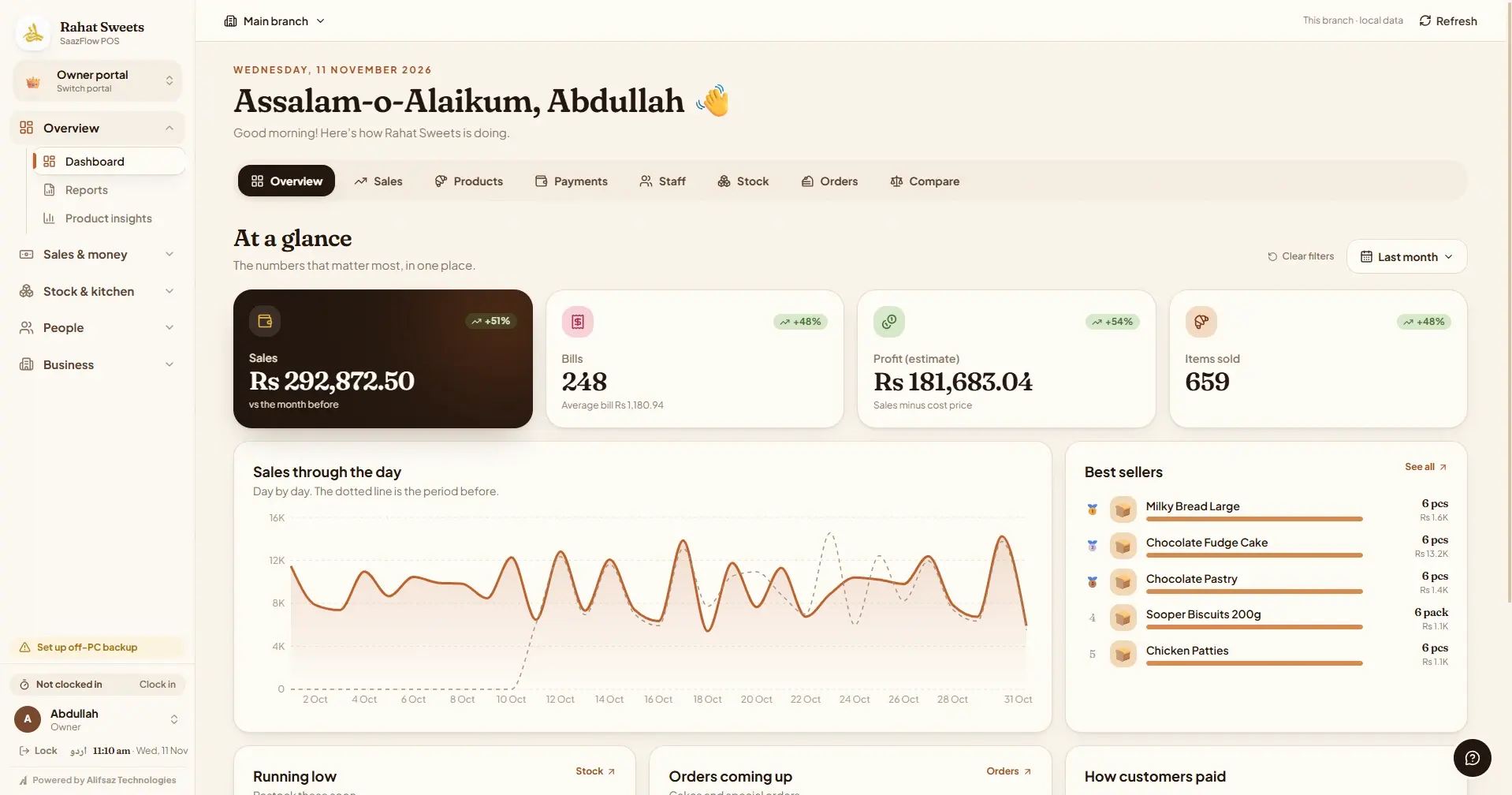
SaazFlow POS owner dashboard showing sales, bills, estimated profit and items sold, a sales chart through the day and the best sellers

Owner dashboard. Today's sales, bills, profit and best sellers at a glance.

The problem

What shops needed from their software.

01

Busy counters

Cashiers need to bill quickly with a barcode scanner or a tap, take several payment methods and handle returns without calling the owner for every change.

02

Unreliable internet

A shop cannot stop selling when the connection drops. Each computer keeps its own database, so billing continues offline.

03

Credit kept on paper

Many customers buy on khata. Paper registers make it hard to see who owes what and when they last paid.

04

Owners away from the shop

Owners want to see sales, stock and staff without standing at the counter or waiting for a report at the end of the day.

Product functionality

Everything the shop runs on.

Fast billing

Product tiles, search, barcode scanners, held bills, discounts and printed receipts.

Six ways to pay

Cash, card, Easypaisa, JazzCash, bank transfer and khata, recorded separately for clear cash closing.

Khata ledger

Customer credit with payments, advances and a full history for every customer.

Stock & receiving

Deliveries, pack sizes, stock counts, low-stock alerts, barcode labels and supplier bills.

Staff & roles

Separate cashier, inventory, kitchen and HR portals with 4-digit PINs, attendance and salaries.

Reports

Sales, profit, stock, customers, suppliers and day close, exportable to Excel and PDF.

Kitchen & recipes

For shops that make what they sell: recipes, production batches and custom orders such as cakes or catering.

Urdu & English

The whole interface switches language, with Urdu text in a bundled typeface.

Safe updates & backups

Automatic updates that save a backup first, plus daily off-PC backups.

Inside the product

A closer look.

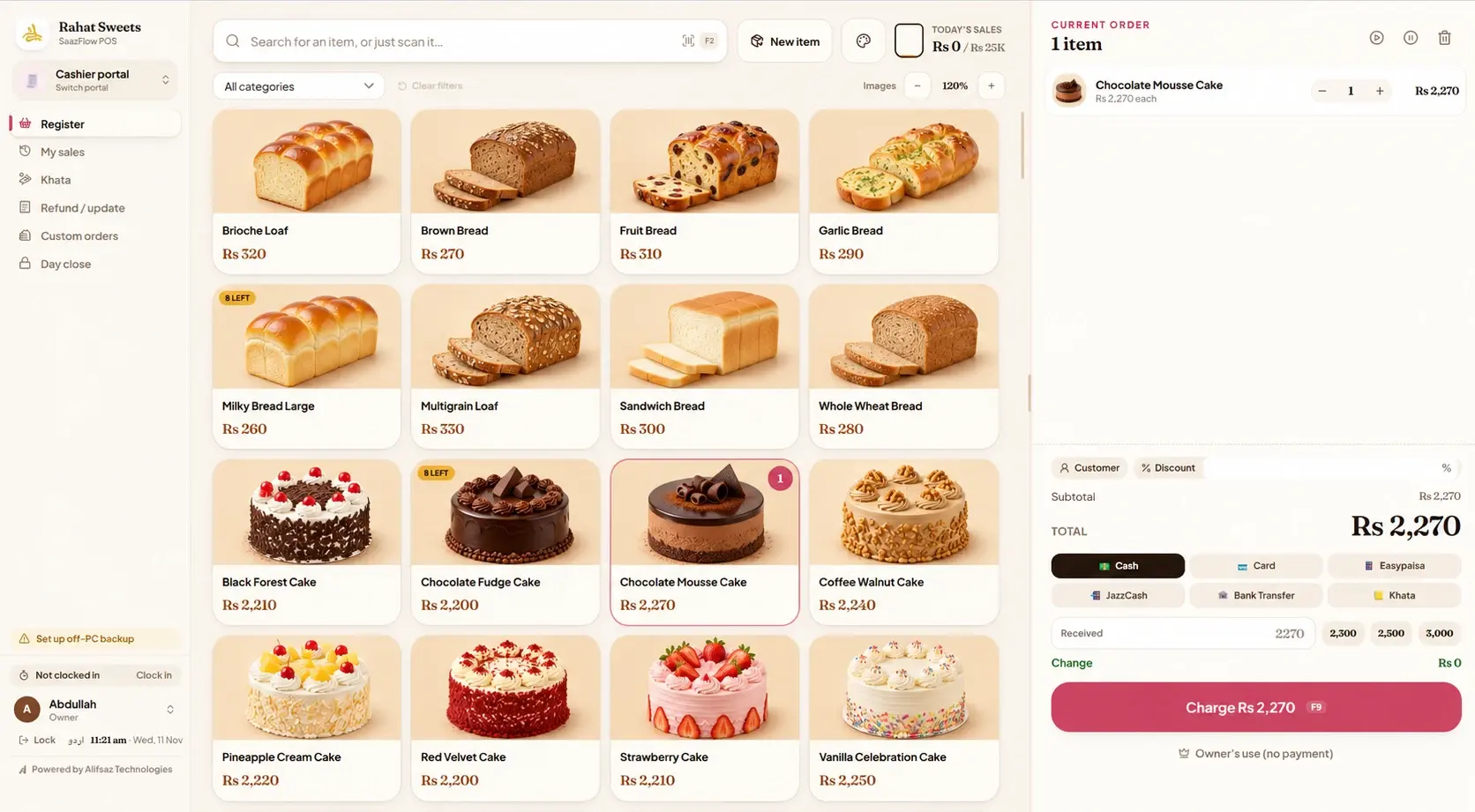
SaazFlow POS register with product photos, the current order, total and payment buttons
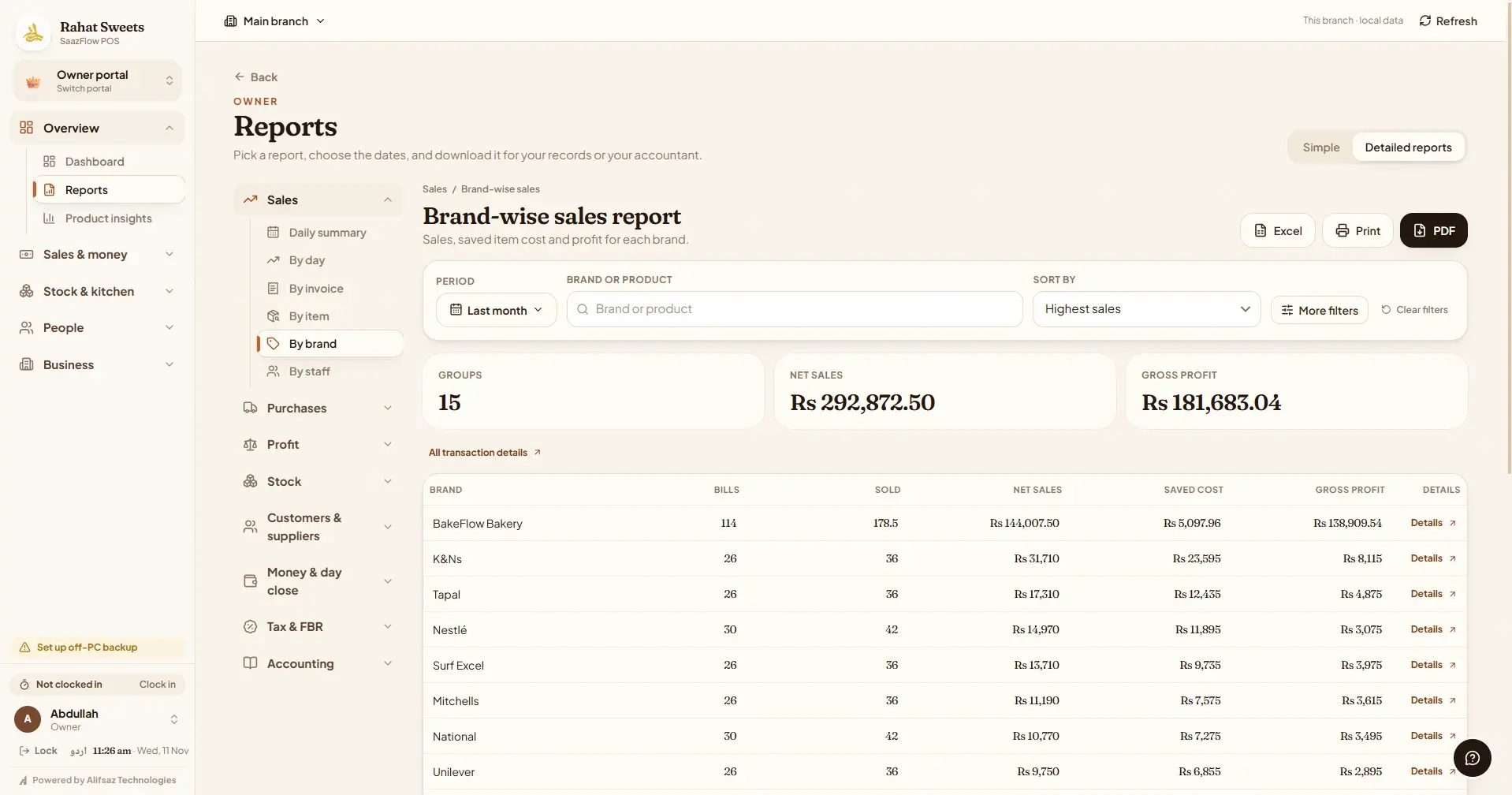
SaazFlow POS brand-wise sales report with net sales, saved cost and gross profit for each brand
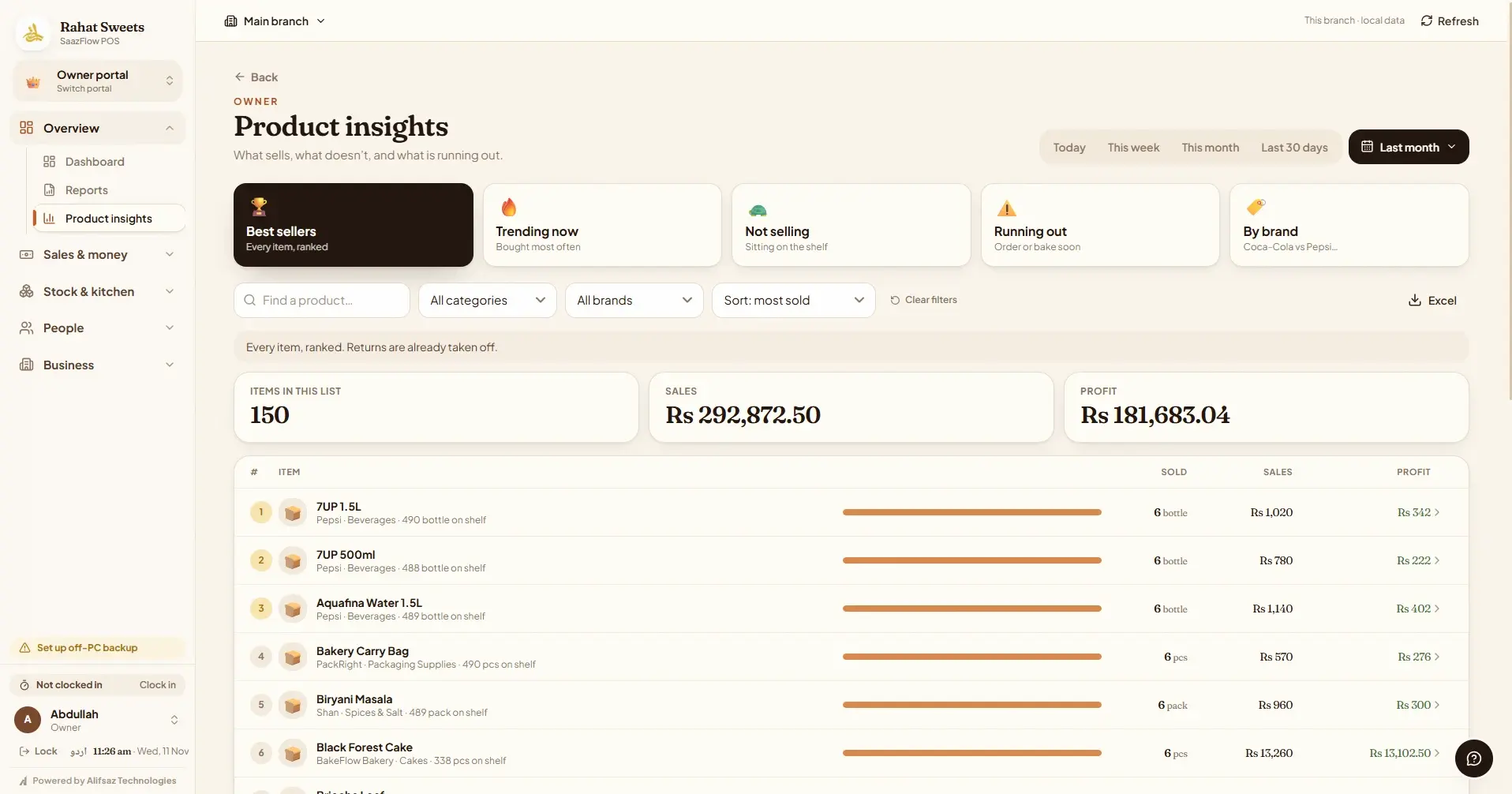
SaazFlow POS product insights ranking best sellers with items sold, sales and profit
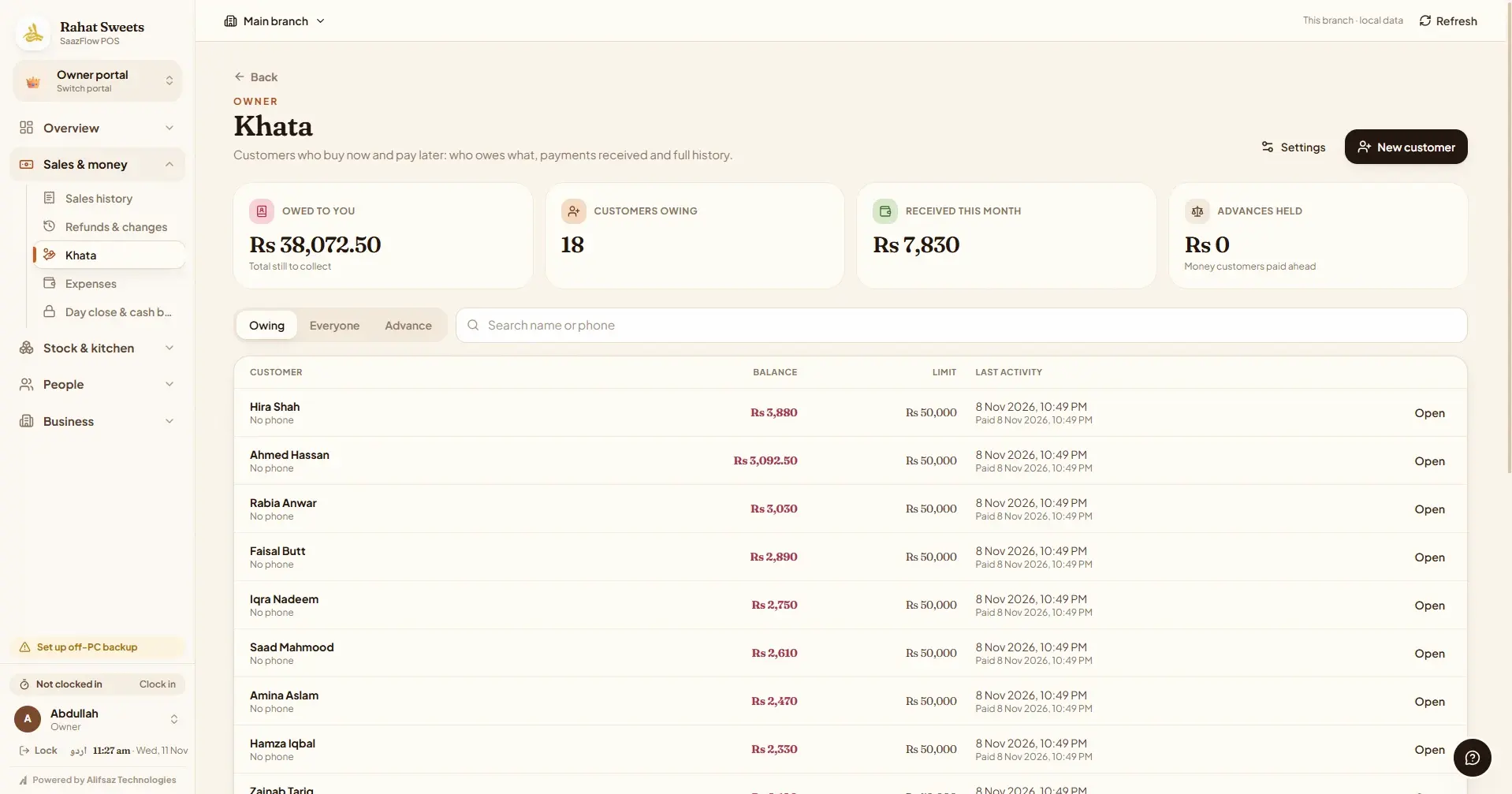
SaazFlow POS khata page listing customers, what each one owes and their last activity
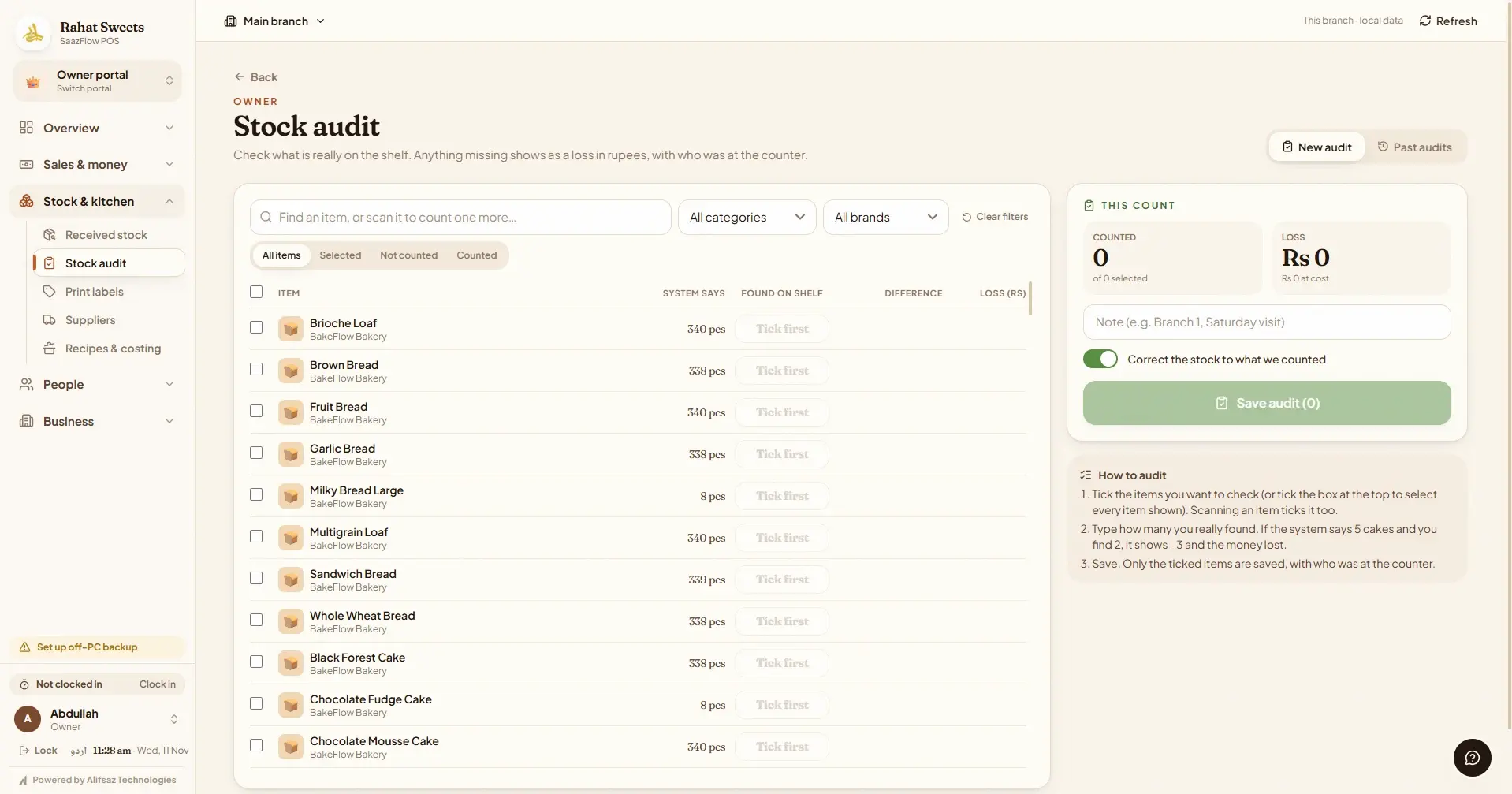
SaazFlow POS stock audit list comparing system stock with the count on the shelf
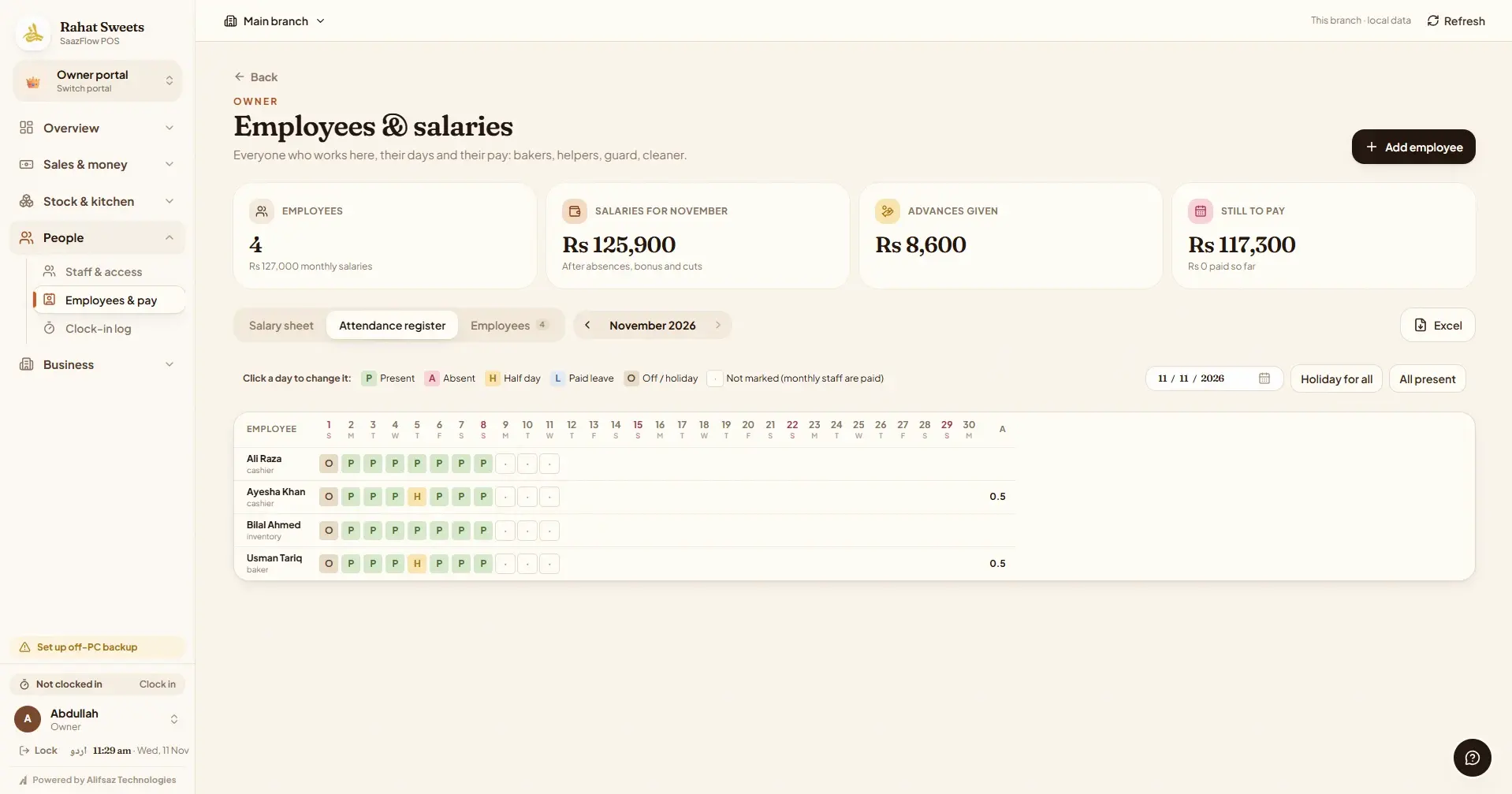
SaazFlow POS employees page with an attendance register and salaries, advances and amounts still to pay
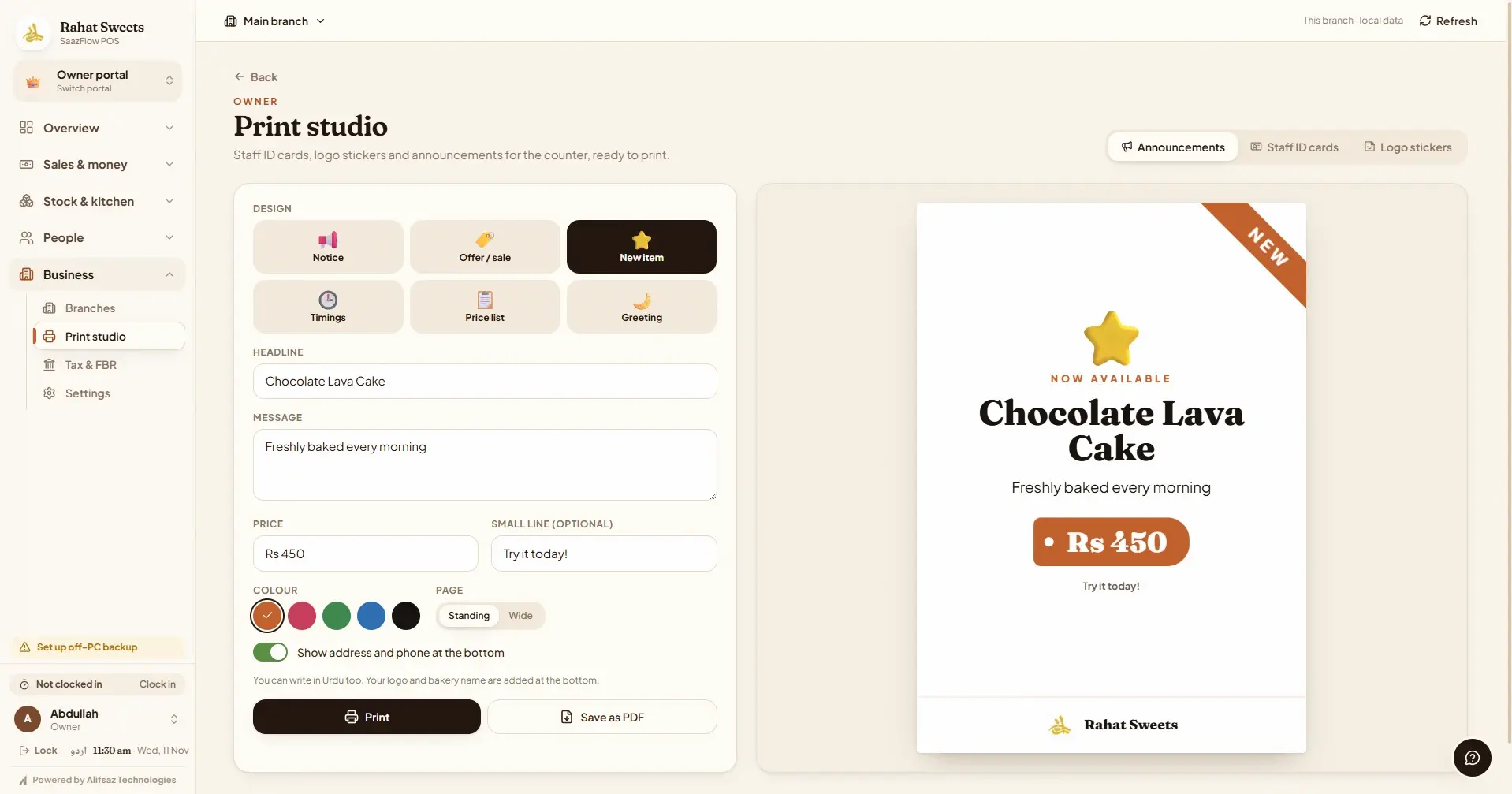
SaazFlow POS print studio designing a new item poster with headline, price and colour
  1. The register. Tap or scan items, take cash, card, Easypaisa, JazzCash, bank transfer or khata, and print the receipt.
  2. Reports. Sales by day, item, brand or staff with cost and profit, ready for Excel, print or PDF.
  3. Product insights. See what sells, what is trending, what is not selling and what is about to run out.
  4. Khata. Customer accounts in one book: who owes you, payments received and every entry, dated.
  5. Stock audit. Count what is on the shelf. Anything missing shows as a loss in rupees, with who counted it.
  6. Employees & salaries. Staff, attendance, advances and salaries owed, worked out month by month.
  7. Print studio. Posters, offers, price lists and staff cards, printed from the shop printer.

Retail workflows

How a day flows through it.

At the counter

  1. 1Scan or tap items
  2. 2Choose how the customer pays
  3. 3Print the receipt
  4. 4Close the day with expected cash

In the stock room

  1. 1Receive a delivery
  2. 2Record packs and costs
  3. 3Print barcode labels
  4. 4Count stock when needed

For the owner

  1. 1Check today's sales
  2. 2See who owes on khata
  3. 3Review staff and expenses
  4. 4Download reports

Supported platforms

At the counter and on the go.

Shop computers

A Windows desktop app for the counter, stock room and kitchen. Several computers in one shop can work together.

Owner on the go

Owners can sign in from a browser or check a phone summary of the shop.

Branches

Owners with more than one branch can view each branch's figures from one account.

Plans

Start free for 10 days.

Compare every feature

Pay yearly and get 2 months free (17% less).

Lite

Everything a single counter needs, kept simple.

Rs 699/ month

10-day free trial, no payment details needed

  • 1 shop, 1 device
  • Fast billing, barcode scanning and receipts
  • Add products and receive stock, with low-stock alerts
  • Product photos with the background removed automatically
  • Automatic discounts for sale days (Eid, Independence Day)
  • Khata (customer credit), expenses and daily cash close
  • Simple reports: every item sold and bought, search by product, invoice or date
  • Urdu and English, automatic updates and off-PC backup
Most popular

Pro

For busy shops with staff and more than one counter.

Rs 1,499/ month

10-day free trial, no payment details needed

Everything in Lite, plus

  • Up to 3 devices in one shop
  • Staff phones as extra counters, live on the shop computer
  • Staff logins, roles and permissions
  • Attendance, salaries and advances
  • Suppliers and supplier bills
  • Detailed reports: profit, stock, customers, tax, with Excel and PDF
  • Recipes, production and custom orders
  • Barcode labels and print studio
  • Owner view from phone or browser

Pro Max

For owners running more than one shop.

Rs 2,999/ month

10-day free trial, no payment details needed

Everything in Pro, plus

  • 3 shops included (main shop + 2 branches)
  • More branches at Rs 799 a month each (Rs 19,999 once with lifetime)
  • Up to 10 devices, plus 3 more with each extra branch
  • Branch-by-branch and combined reports
  • Priority support

FAQ

Questions shops ask.

SaazFlow POS is point of sale (POS) and billing software for retail shops in Pakistan, made by Alifsaz Technologies. It runs on Windows computers and covers barcode billing, stock, khata (customer credit), expenses, staff, salaries and reports, in English or Urdu.

Any shop that sells from a counter: general stores and marts, grocery shops, bakeries, sweet shops, cafés and other retail shops. Bakeries and sweet shops also get custom orders, recipes and production on the Pro plans.

Lite Rs 699, Pro Rs 1,499, Pro Max Rs 2,999 a month. Paying yearly costs the price of 10 months, and a lifetime licence is a single payment of 2.5 × the yearly price (Lite Rs 17,499, Pro Rs 37,499, Pro Max Rs 74,999). Every plan starts with a 10-day free trial, with no card needed.

Yes. Ordinary USB barcode scanners work straight away, receipts print on the shop's receipt printer or save as PDF, and the Pro plans print barcode labels for your own products.

Yes. Sell on khata at the counter, take payments later and see who owes you, how much and since when. Every entry is dated and kept.

Yes, on the Pro and Pro Max plans. The owner signs in from a phone or any browser to see sales, stock and staff while the shop computer keeps billing.

Choose a plan and enter your shop details. We email a verification link; your 10 free days start after you verify and choose your password. Download the Windows app and sign in with that email. No payment details are needed and there is no automatic charge. If you continue, your products, sales and settings stay exactly as they are.

There is a 7-day grace period where everything keeps working with a reminder. After that, new sales pause until payment is recorded. Your records, reports and backups always stay available.

Yes. Move up or down when your shop changes. Your data stays where it is.

Yes. Billing works offline because each computer keeps its own records. It needs the internet now and then to check the subscription and to back up.

Monthly, yearly or once for a lifetime licence, by bank transfer or mobile wallet. Contact us on WhatsApp or email and we will confirm the details.

Yes. We help you add products, staff and printers so your counter is ready to sell.

READY WHEN YOU ARE

Your next sale starts here.

Create your shop account, verify your email and install SaazFlow on your Windows 10 or 11 computer. Your 10-day trial starts after verification. No card, no automatic charge.

Already have an account? Download the installer and sign in with your existing email and password. Remote access needs your shop computer on and connected.

Message us(opens WhatsApp in a new tab)